Showing posts with label bookmarks. Show all posts

Monday, March 4, 2013

My First World Dilemmas

A few weeks ago, I was having lunch with my friend, Becky. I told her that I was going to quit blogging except when we were traveling. Becky asked me why and I replied "How much can one write about themselves?" I shouldn't even be writing about myself, but as you may remember, Barry started taking a little offense that every blog was about him.

Since then, however, I have had a couple of people mention that they enjoy reading my blog. A couple might even be an exaggeration, but I know there is one person out there that said they enjoy it!

In order to make myself feel better about an activity that I have come to feel a little narcissists, I will no longer be emailing the blog to anyone (unless you specifically ask me too.) Yes, in order to get some readers, (like Brett), I had to email my blog to them.

I'm divided about even posting it on Facebook. I have an idea, why don't you just bookmark the blog if you want to read it? I tell you what, I will even post tomorrow about Bookmarking or saving to your home screen on your iPhone or iPad for some of my less tech-y friends. Then, if you wish to read the blog, read it, if you don't...don't.  That will make me happy. If you do read the blog, comments make me even happier.

I would like to thank everyone that has helped me out in the last six weeks after my hand surgery. Barry has been great. He learned where I kept the sheets. I am not sure why those fitted sheets are so hard for him though.  I received many cards and thank everyone for their kind words. My family and friends brought meals and spoiled me rotten. My hand is better everyday. I'm hoping by April I will be as good as new.

Every blog needs a photo and while taking photographs is still difficult to do with my hand, I was able to capture a couple from our recent trip to Houston. While we were there, we took the girls to Edith Moore Bird Sanctuary near Joanie and Jacob's house. We actually did not see too many birds (I knew you would want to know), but we had a great time with the girls.

Ava sported the finest in bird watching attire.


Lucy loves her 'Poppy' as you can tell by her face in this photograph.


and we all enjoyed the beautiful day.
Joanie & Lucy
jb


Tuesday, September 11, 2012

Tech Tuesday- iPhone News

The new iPhone 5 will be out very soon. Dates from September 12th to around September 20th are floating around.

I just wish it wasn't so hard to find out from AT&T if I qualify for an upgrade.

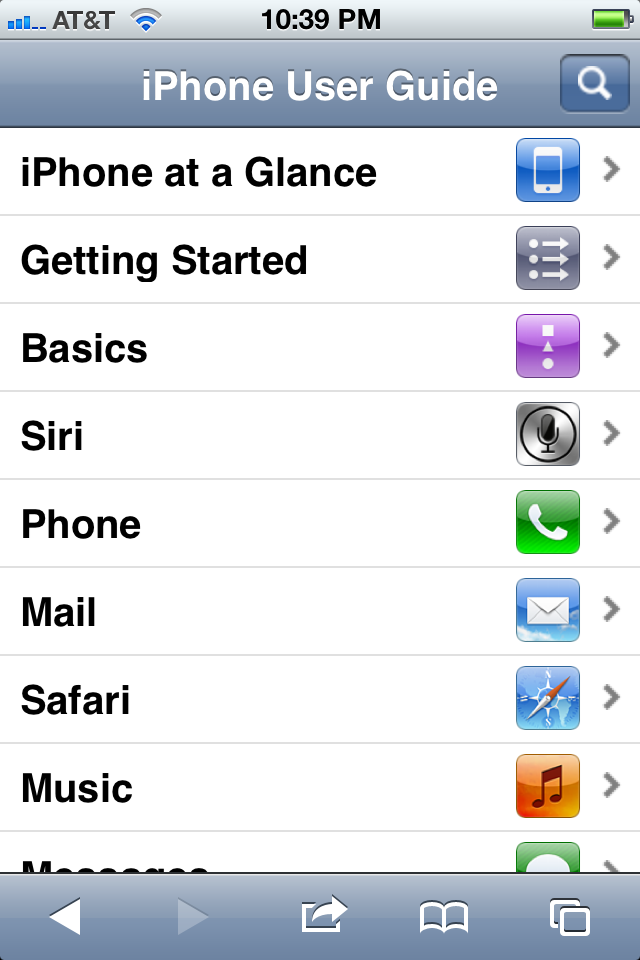
Am I the only one who didn't know that the iPhone User Guide is right there on the phone?
Yep, it's there. Here is how to access it, if you too didn't know this tidbit of information.

1. Open up Safari

2. Tap your bookmark icon to open up your bookmarks

3. Scroll until you see iPhone User Guide
    (mine was at the very last bookmark)


When you open the bookmark, there are the contents of your iPhone manual.


This makes me think I need to clean up my bookmarks. But that will have to wait for another Tech Tuesday. 

Tuesday, May 8, 2012

Here it is Tech Tuesday, and I have to begin with a confession. I have failed computer 101. I believe that my post Friday did not appear due to writer error. I am afraid I may not have saved the post before trying to post it. There is a little loop hole, though, in that I was using my iPad with an app, not my computer with the regular program. I would like to think that I possibly surpassed the maximum usage of the app with photos and my snappy post. We will never know, so let me begin this Tech Tuesday with a very important reminder:

Always SAVE your work. Whether that is backing up to an external hard drive, the cloud, or whatever, always save anything that you wish to keep. 

Now you should be aware of the extent of my knowledge. Tech Tuesday, may not last long.

I am going to start fairly basic and will focus on Apple products (because that's all I know). But, if you are one of my friends that has asked me a question, this is for you.

Today I am going to review adding new bookmarks on your iPad and iPhone. To let you know what my desktops look like, I have an original iPad and an iPhone 4.

Let's say you have a website that you would like to bookmark. While you are on the web page, touch the icon that is a rectangle with a right pointing arrow in it. On the iPad it is on the top of the page to the left of the web page address. On the iPhone it is at the bottom center of the screen.

On the iPad you will see this pop up window. You can choose Add Bookmark.


 Then you can choose where this bookmark goes. On this example, I have Bookmark Bar chosen. This will place the bookmark below the address box. You can touch that box and it will give you other folders or places in bookmarks to save the webpage.


Another alternative is to save the webpage directly to your Home Screen. (on a regular computer, we would just call this our desktop). 


This is what my Home Screen looks like with some websites saved to it. 
You can organize these also, but we will save that for another day. 


 The iPhone works basically the same way. The icons to do so are just in a different place. Notice the rectangle with the arrow is in at the center, bottom of the screen.


When you touch that icon the same screen pops up as on the iPad. 


When you select the Add Bookmark or Add to Home Screen, you will get the same screen as above.
Go ahead and save your favorite website, so you don't have to search for them. Share your favorites with the rest of us!

Now for an app review. Your iPhone and iPad should have the app Reminders on it. Not only can you write yourself reminders, you can set the app to remind you of your task as you leave your house or arrive at your destination. Of course, if you are using the 4S, you have Siri to do this for you.

Is this too basic? Let me know!